
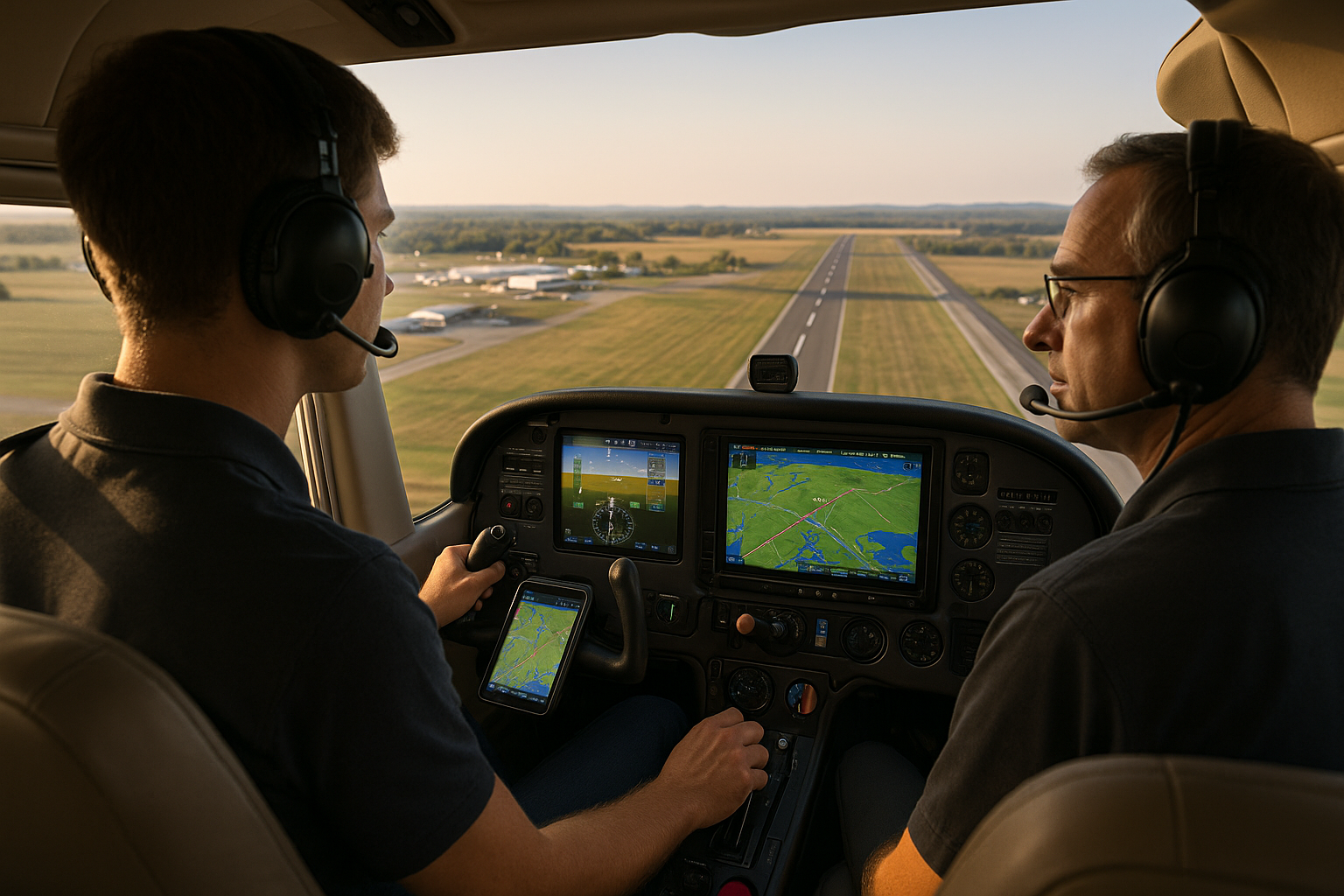
Pattern work is a foundational skill for pilots, and integrating modern technology into traffic pattern practice changes how instructors teach and how pilots build situational awareness. In this article I use the term pattern work to mean repeated approaches, landings, and traffic pattern operations at airports under visual flight conditions, and I show how electronic flight bags, ADS-B traffic, GPS moving maps, and glass cockpit displays can support safer, more efficient training.
Whether you are a student pilot learning your first rectangular pattern, a certificated pilot refining landings, or an instructor designing effective lessons, this guide explains what modern tools do, how they change cockpit flow, and which practices preserve core piloting skills while leveraging technology. You will find practical flying guidance, a realistic scenario, common mistakes to avoid, and clear takeaways for training and safety.
Core Concepts: How Modern Technology Supports Pattern Work
At its heart, pattern work is about consistently flying stable approaches, managing energy, and maintaining position relative to the runway and other traffic. Modern technology does not replace those fundamentals. Instead, it provides additional information layers: traffic position, precise GPS-derived position and groundspeed, runway and airport diagrams, stabilized approach cues from flight instruments, and playback for post-flight debriefing.
Key modern tools used in pattern work include electronic flight bags and apps, ADS-B In traffic displays, GPS moving maps with terrain and obstacles, multifunction displays in glass cockpits, and video recording devices for technique review. Each tool alters pilot workload and situational awareness in predictable ways. A well-organized cockpit integrates these tools to reduce surprises, assist memory, and create objective feedback for training.
Why This Matters in Real-World Aviation
Traffic pattern operations are where many pilots spend the bulk of their practical flying time. Patterns concentrate traffic, increase radio communications, and frequently occur in mixed-experience environments. Small errors in judgment or attention during pattern work can lead to runway incursions, loss of separation, or unstable approaches. Modern technology can reduce these risks by improving traffic awareness and position accuracy, but only when used thoughtfully.
From a training perspective, modern displays and recording tools let instructors show students exactly where their glide path, bank angles, or pitch inputs diverged from the ideal. For operators, standardizing the use of EFBs or traffic sources can clarify procedures and reduce ambiguity about who sees which traffic. For safety programs, objective data from recorded flights can inform recurrent training or remedial instruction without relying entirely on subjective memory.
How Pilots Should Understand Technology in the Pattern
Think of technology as an augmentation to your basic scan and judgment. Your primary references in visual pattern work remain outside-the-window visual cues, airspeed, and aircraft attitude. Instruments and displays support those cues and provide backup. Use the following mental model when you fly pattern work with technology: primary visual scan first, instrument cross-check second, and technology verification third. That order preserves visual control while benefiting from accurate positional data.
Organizational habits matter. Before takeoff, set up your displays so the essential items are prominent: the airport diagram or runway heading, the traffic display or traffic list if available, flight plan or approach legs if practicing specific maneuvers, and any checklist items. Reduce clutter by hiding layers you do not need during the pattern. If you use video capture for debrief, confirm camera angles and storage capacity preflight so the cockpit flow is not interrupted mid-lesson.
Common Mistakes and Misunderstandings
Introducing technology into pattern practice brings a few predictable pitfalls. Many of these arise from overreliance, distraction, or poor system setup.
One common mistake is fixating on the traffic display at the expense of visual scanning. ADS-B traffic or traffic from other sources can give a false sense of security. Not all aircraft will broadcast or appear on your display, and display update rates and relative position depiction vary. Treat on-screen traffic as advisory information, not primary clearance or separation assurance.
Another misunderstanding is assuming GPS-derived position replaces visual judgment for spacing or final alignment. While GPS is highly accurate for ground track and groundspeed, visual cues about wind, drift, and landing aim point are still the controlling factors. Pilots who follow a moving map strictly to judge spacing can end up unstable on final because they neglected an outside scan of closure rate and relative angle to the runway.
Finally, poor cockpit organization undermines the benefits of technology. Too many active layers, unlabeled pages, or insufficient redundancy for critical items like approach briefings create confusion in high-work moments. Use standardized display pages and practice the button presses or gestures you will need during a normal pattern to make those inputs automatic.
Practical Example: Teaching Touch-and-Go Practice at a Busy GA Airport
Scenario: You are a flight instructor running a 60-minute dual lesson focusing on improving student touchdown consistency at a moderately busy general aviation airport with a control tower. The objective is to practice series of touch-and-go landings while maintaining proper spacing and radio discipline.
Preflight setup. Before taxi, pull up the airport diagram on your EFB and mark the runway in use. Load the active runway as the primary map focus and verify the traffic display is centered with runway orientation. Confirm that the audio from ADS-B or other traffic sources is set to a comfortable level and that the moving map orientation matches your usual preference.
Briefing. Give the student a concise brief that includes the pattern entry, expected traffic flow, intentions (touch-and-go), and the go-around criteria. Explain that the traffic display is supplemental and that their primary tasks are airspeed control, aiming point selection, and judgement of drift on final. Outline when you will take control and how you will call it.
During the pattern. Use the traffic display to anticipate known targets that might affect spacing. For spacing judgment, use groundspeed trends on the moving map plus visual closure cues. If the on-screen target appears to be closing unusually fast, verify visually. Announce to the student what you see on the display and how you are integrating that information with visual cues. Keep radio calls crisp and consistent; label touch-and-go intentions clearly on initial callouts.
Debriefing. After the series, use any recorded data or video to show where the student floated, late roundouts, or drift corrections occurred. If the avionics log or moving map captured groundspeed, use that to explain energy management during touchdown. Emphasize what the student should have noticed visually in each pass rather than relying solely on the display readout.
Best Practices for Pilots Using Technology During Pattern Work
Organize your cockpit for clarity. Position moving maps, traffic, and primary flight information where you can glance at them without moving your head significantly. Keep nonessential apps or pages closed during pattern practice.
- Brief before taxi. A short, clear plan reduces in-flight decision stress and organizes attention while flying the pattern.
- Use technology to enhance, not replace, visual scan. Treat ADS-B and traffic displays as advisory. Confirm any crucial traffic visually or by radio communication.
- Standardize display pages. Use a small set of pages you always rely on so transitions are automatic and reliable.
- Practice instrument flow with technology. Run through a simulated pattern in the classroom or during a briefing to show which buttons or gestures you will use and when.
- Use recordings for objective feedback. Video and flight data allow targeted coaching on specific control inputs and energy management.
- Maintain sterile cockpit discipline for critical phases. Minimize nonessential conversations and tasks when on short final or inside the downwind leg if workload is high.
Integration with Instructional Techniques
When you teach pattern work with modern tools, adjust your instruction to emphasize sensory fusion. Encourage students to cross-check outside references with instrument cross-check and the technology layer. Use technology deliberately in lessons where it provides clear value, such as precise groundspeed analysis during float, or video replay showing flare technique.
Design lesson objectives that isolate one variable at a time. For example, spend one flight practicing stabilized on-speed approaches without using the traffic display for spacing. On another flight, emphasize traffic scanning and cooperative use of ADS-B to build threat recognition. Breaking lessons into focused blocks prevents cognitive overload and ensures students develop raw flying skills and technology integration skills separately.
Human Factors: Attention, Automation Surprise, and Decision-Making
Introducing more automation and displays can shift the nature of mistakes from procedural errors to complacency or automation surprise. Automation surprise happens when a pilot expects the system to behave one way and it does not. Avoid this by knowing what your displays can and cannot show, and by practicing manual reversion to basic visual control when the system disagrees with what you see outside.
Attention management is equally important. Use simple cues and callouts to synchronize instructor and student attention. For example, call 'verified' when you see a traffic target visually that was initially detected on your display. This ties the instrument layer back to the outside view and helps students associate display symbology with real-world targets.
Equipment and Setup Recommendations
Not every aircraft needs the latest panel to benefit from modern tools. Even a handheld tablet running a reputable EFB app and receiving ADS-B In traffic can provide meaningful situational awareness improvements. Prioritize reliable power, secure mounts, and a simple, repeatable workflow. Practice your setup on the ground and in low-workload conditions before relying on it in busier patterns.
Consider these practical setup rules: keep the primary moving map in a fixed location on the pilot side, ensure backup battery or dedicated power for EFBs, and configure audio so you can hear traffic alerts without masking critical ATC or tower communications. If you use a portable camera for recording, ensure it is mounted securely and will not block any primary instruments or vents.
Common Regulatory or Operational Boundaries to Keep in Mind
Operational use of technology can be influenced by local airport rules, operator standard operating procedures, or instructor policies. Avoid assuming that every traffic target you see can be used as legal separation. If you fly in Part 91 or other operational environments with formal procedures, follow those procedures first and treat technology as supplemental. Always follow any local radio or pattern entry procedures and maintain clear communications when traffic density increases.
Because this article does not provide regulatory directives, confirm any required operational documentation or operator manuals for your specific aircraft and operations. If you are using a service that integrates with ATC or provides advisory electronic services, verify the service limits in its documentation before relying on it for separation decisions.
Frequently Asked Questions
Can ADS-B replace visual scanning in the traffic pattern?
No. ADS-B In is an advisory tool that improves traffic awareness for broadcast-equipped aircraft. It does not detect non-cooperative targets and display update or latency can affect perceived closure rates. Continue an outside visual scan and use ADS-B information to augment, not replace, visual lookout.
Should student pilots use a moving map during pattern work?
Yes, when used intentionally. A moving map helps with orientation, taxi route confirmation, and runway identification. However, instructors should stage its introduction to avoid distraction. Introduce moving map use first on ground briefings and low-workload segments, then progress to limited in-pattern use once the student demonstrates stable lookouts and aircraft control.
How should an instructor debrief pattern work that used technology?
Use objective data sparingly and with context. Start with the student’s perception of the flight, then show video or instrument data to highlight specific moments. Focus on one or two teachable elements per debrief so feedback is actionable. Reinforce what the student did well before reviewing corrections.
Does recording pattern work create privacy or legal issues?
Recording rules vary by jurisdiction and operator policy. Ask passengers for consent, secure any personal data, and follow organizational guidance about storage and use. For professional environments, incorporate clear policies into training agreements and data management plans.
Practical Training Progression Example
Progress student training in these stages. Stage 1: Fly basic patterns visually without any EFB or traffic display to build raw visual scanning and control. Stage 2: Introduce moving map for orientation and taxi briefings only. Stage 3: Add ADS-B traffic display to practice identifying potential conflicts and correlating screen targets with outside references. Stage 4: Use video and flight data for debriefing and targeted improvement on flare, touchdown point, and roll-out technique. Each stage should last long enough that the student demonstrates consistent performance before moving on.
Resources for Further Practice
Practice in a variety of traffic densities and wind conditions to understand how technology informs rather than controls decisions. Fly in controlled and uncontrolled fields, in calm and gusty wind, and during times of higher traffic. Use tabletop briefings and replay sessions to compress learning. When available, work with mentors or peers to review recorded flights for diverse perspectives on common technique errors.
Key Takeaways
- Practical takeaway: Use technology to reinforce the basic skills of a stable approach, not to replace visual flying and judgment.
- Safety takeaway: Treat ADS-B and traffic displays as advisory; always verify important targets visually and via radio communications when necessary.
- Training takeaway: Stage technology introduction so students develop raw flying skills before adding electronic layers, and use recordings for targeted, objective debriefing.
Final Thoughts
Modern technology offers clear benefits for pattern work when integrated thoughtfully into instruction and cockpit flow. It provides better situational awareness, objective feedback, and refined debriefing tools. The trade-off is potential distraction and overreliance. Effective training balances manual flying proficiency with deliberate use of electronic aids so pilots remain fully capable in any environment.
Adopt a conservative and staged approach to introducing devices and displays. Keep preflight setup simple, standardize display pages, brief actions and callouts clearly, and use postflight data to reinforce learning. When instructors and pilots use technology with discipline, pattern work becomes safer, more efficient, and more instructive.