Flight simulators are a core training tool for pilots, instructors, and aviation operators seeking safer, more efficient, and higher-quality skill development. Well-designed simulator sessions let pilots practice procedures, decision making, and emergency responses in a controlled environment without the cost and risk of live flight. This article explains how flight simulators improve pilot performance, what aspects of pilot skill they address, and how to get the most practical value from simulator-based training.
Whether you are a student pilot building basic cockpit flow and crosswind technique, an instructor aiming to structure scenario-based training, or a professional pilot maintaining proficiency, understanding simulator capabilities and limitations will help you use them effectively. This article covers the technical foundations of simulator training, real-world applications, common misunderstandings, practical examples, and clear takeaways you can apply in your own training program.
How Flight Simulators Improve Pilot Performance
At the core, simulators improve pilot performance by allowing structured repetition, exposure to rare or hazardous scenarios, and focused skills practice. They remove operational pressures such as passenger risk, aircraft wear, and fuel costs while preserving the core cognitive and procedural demands of flight operations.
Key performance areas supported by simulators include procedural proficiency, systems knowledge, threat and error management, crew resource management, and handling of abnormal and emergency situations. Pilots can practice instrument approaches in degraded visibility, systems failures, unusual attitudes, or high-workload sectors repeatedly until performance stabilizes. Repetition in a simulator reinforces habitual responses and reduces the likelihood of hesitation or confusion when similar situations occur in the aircraft.
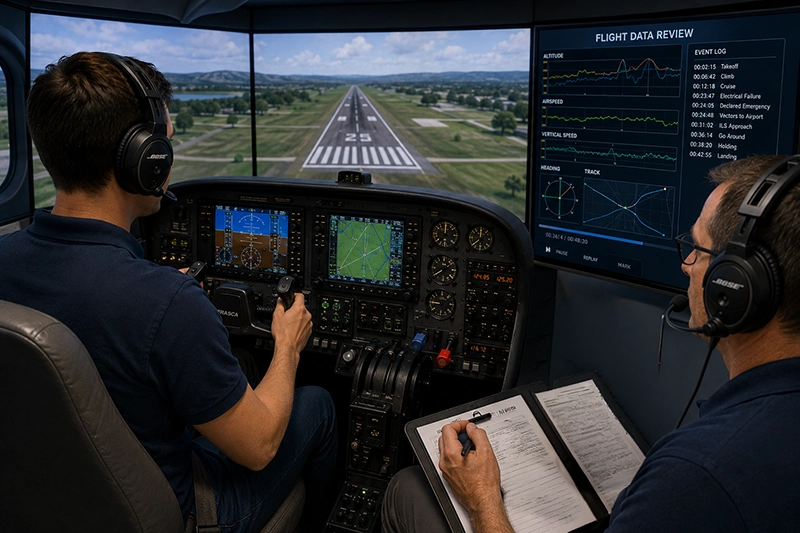
Simulators also let instructors control variables precisely. By adjusting weather, system failures, or air traffic scenarios, an instructor can design training that targets specific weaknesses or builds higher-order skills such as decision making under time pressure. The ability to pause, replay, and debrief using recorded cockpit audio and flight data accelerates learning by making errors visible and understandable.
Why This Matters in Real-World Aviation
Improvements in simulator-acquired skills translate into safer, more consistent performance in real aircraft when training is realistic and correctly transferred. Simulator work lowers the threshold for exposure to high-risk events: pilots can experience engine failures, electrical faults, or control malfunctions in a way that preserves real-world consequences without danger. This exposure builds mental models of system behavior, clarifies crosschecks, and strengthens the link between cues and corrective actions.
For operators, integrating simulator training reduces the need for some in-air interventions, supports standardized crew procedures, and helps meet organizational proficiency needs efficiently. For single-pilot operators and flight instructors, simulators permit focused scenario practice that would be costly or impractical in flight. For airline or commercial operations, simulators are central to recurrent training and type transition because they can emulate aircraft systems and airspace interactions that are impractical or unsafe to replicate in normal operations.
How Pilots Should Understand This Topic
Not all simulators are equal. Simulator fidelity affects which skills transfer effectively to the airplane. Visual systems, motion cues, control loading, and system modeling all contribute to the sense of realism. High-fidelity simulators offer more accurate handling and system responses, which is important when practicing fine control, energy management, or system troubleshooting. Lower-fidelity trainers are still very useful for procedural practice, navigation, instrument crosschecks, and decision-making drills.
Pilots should view simulators as training tools with specific strengths: they are excellent for cognitive rehearsal, systems understanding, cockpit flows, and CRM practice. They are less effective for practicing tactile cues that rely on forces and aerodynamics not modeled at high fidelity. Awareness of the simulator's capabilities and limitations helps pilots set appropriate objectives for each session.
Effective simulator use follows from careful session design. Start with clear, measurable objectives: what should the pilot be able to do by the end of the session that they cannot reliably do now? Use scenarios that mimic operational pressures, introduce realistic distractions, and emphasize decision points. End with a focused debrief that ties observed actions back to objectives and highlights corrective steps or follow-up training that is needed.
Simulator Capabilities and Technical Concepts
Understanding the technical components of simulators clarifies how they support learning:
- Visual systems: High-resolution, wide-field visuals provide environmental cues such as runway perspective, traffic, and terrain. Visual fidelity matters for visual approaches, traffic scanning, and spatial orientation tasks.
- Motion cues: Some simulators include motion platforms that provide vestibular feedback to the pilot. Motion enhances the realism of maneuvers and helps with perception of pitch, roll, and acceleration, but its absence does not prevent effective training for many procedural or systems-focused lessons.
- Force and control loading: Accurate replication of control forces, trim behavior, and aerodynamic response supports precise handling practice. Trainers without realistic control loading are still useful for procedure flows but less suited to fine-stick control training.
- System modeling: Faithful representation of aircraft systems and failure modes allows troubleshooting practice and systems-based decision making. The depth of system modeling determines how realistic fault diagnosis and recovery feel.
- Debrief and data capture: Recording flight data, cockpit audio, and instrument displays enables evidence-based debriefing. Playback allows instructors and pilots to isolate errors, discuss alternatives, and rehearse improved responses.
Common Mistakes or Misunderstandings
Pilots and organizations sometimes over- or under-estimate what simulators can accomplish. Common pitfalls include:
- Assuming simulator practice alone will make up for limited actual flight experience. Simulators are a force multiplier, not a direct substitute for time-in-type in some contexts.
- Using simulators only for procedural rehearsal without integrating decision-making and human factors. Simulator sessions that ignore communication, workload management, and distractions miss a major opportunity to improve real-world performance.
- Expecting identical tactile cues in simulators lacking motion systems or accurate control loading. This can lead to overconfidence when transitioning back to an airplane with different feel.
- Failing to set clear objectives or metrics for success. Without concrete performance targets, simulator time may become unfocused and less likely to produce measurable improvement.
- Designing unrealistic scenarios that either trivialize problems or present impossible situations. Scenarios should be challenging but plausible within the operation’s context.
Practical Example
Consider a single-pilot IFR pilot preparing for winter cross-country flights. The pilot schedules a simulator session focused on partial-panel instrument flying, systems recognition, and missed approach procedure execution in heavy snow and low ceilings. The instructor programs an electrical bus failure combined with degraded radio comms and a GPS outage to force the pilot to revert to basic instrument scan and conventional navigation. During the scenario the pilot must prioritize tasks: maintain control, configure for approach, declare an emergency if needed, and manage automation appropriately.
After the scenario, the instructor uses recorded flight data to show where the pilot's scan narrowed during workload peaks and where opportunities existed to simplify tasks—such as diverting to a nearby field earlier or calling ATC sooner. The pilot repeats the scenario with targeted coaching on attitude instrument crosschecks and timing of critical checklists. Over successive runs the pilot's responses become smoother, and decision points occur earlier and with less distraction. The pilot leaves the session with a checklist of actions to practice in the airplane and a clearer mental model for prioritizing tasks under partial panel conditions.
Best Practices for Pilots
To maximize the value of simulator training, adopt these practical habits:
- Define measurable objectives for each session. Know what skill or decision you are targeting and how success will be observed.
- Design scenarios that reflect operational reality. Tailor weather, airspace, and system failures to the types of flights you fly.
- Combine technical flying with human factors. Add distractions, abnormal communications, or unexpected ATC requests to train prioritization and workload management.
- Use debrief data. Review recorded parameters and take notes on specific behaviors to change. Convert feedback into a short practice plan for both simulator and aircraft follow-up.
- Balance simulator practice with real flight time. Use simulations to practice infrequent or hazardous events and complement them with live practice of handling and control skills where tactile feedback matters.
Integrating Simulator Training into a Curriculum
Simulators can be integrated at many points in pilot development. For students, simulators provide an efficient way to learn instrument scan, navigation, and cockpit flows before committing aircraft time. For advanced students and new type pilots, simulator sessions allow focused practice of complex procedures, abnormal checklists, and crew coordination.
For recurrent training, simulators are ideal for refreshing memory of non-normal procedures, maintaining currency for instrument approaches, and rehearsing decision-making strategies. When paired with scenario-based assessment, simulators can highlight degraded performance that may not show up on a standard proficiency check.
Design a progressive curriculum: start with foundational tasks in simulator environments that emphasize procedure and recognition. Move to higher-fidelity scenarios that include systems failures and crew communication, then integrate full-mission rehearsals that mirror operational flights. Prioritize follow-up in the aircraft where physical handling and sensory feedback are essential.
Common Questions About Simulator Fidelity and Transfer
Pilots frequently ask about how well simulator skills transfer to real aircraft. Transfer is strongest for cognitive skills: checklist flows, instrument crosschecks, radios and navigation, and decision making. Transfer of fine motor skills and tactile control is tied to the simulator's motion and force-feedback capabilities. Recognize which skills you aim to train and choose the appropriate simulator level accordingly.
Safety Considerations and Limitations
Simulators are powerful but not omnipotent. Training leaders should manage expectations and understand limitations: simulators may not reproduce all aerodynamic behaviors, especially near stall boundaries or in damage conditions. Motion systems can introduce misleading cues if not properly calibrated. Instructors should supervise scenarios carefully to ensure pilots are not learning incorrect control habits or relying on simulator-specific cues that do not exist in the airplane.
Additionally, training programs should guard against desensitization to emergencies. Repeated exposure to simulated crises without linking them to realistic consequences may degrade urgency in real emergencies. Debriefing that emphasizes the seriousness of potential outcomes and links simulator practice to actual aircraft procedures helps maintain appropriate levels of caution.
Frequently Asked Questions
How often should I use a simulator to maintain proficiency?
Frequency depends on the type of flying you do and the skills you need to maintain. Use simulators regularly to practice instrument procedures, non-normal scenarios, and decision-making. Pair simulator sessions with actual flight practice for handling skills. For professional operations, follow your organization’s training and recurrent schedule; for personal operations, schedule simulator work to reinforce critical skills before challenging flights.
Can a simulator replace in-aircraft training for skill development?
Simulators complement but do not fully replace in-aircraft training. They are excellent for procedural knowledge, systems troubleshooting, and decision-making practice. However, some tactile and sensory skills—control feel, actual turbulence response, and real-world visual references—require aircraft time. Use simulators to reduce risk and cost while targeting areas that benefit most from repetition and scenario exposure.
What should I look for when selecting a simulator or training device?
Match the simulator features to your training objectives. For procedural and instrument crosscheck practice, a desktop or flight training device with accurate avionics may suffice. For handling and motion cue training, seek higher-fidelity devices with realistic control loading and motion systems. Also consider the quality of the instructor, scenario library, debrief tools, and the ability to record and analyze sessions.
Are simulated emergencies realistic enough to teach real emergency handling?
Simulated emergencies teach recognition, procedural steps, and decision prioritization effectively. They also help build confidence in following checklists and managing workload. Real-world handling of emergencies also requires experience with tactile cues and aircraft-specific behaviors, so pair simulator practice with supervised in-aircraft training where possible.
How can instructors make simulator sessions more effective?
Start with clear objectives, build realistic scenarios, and include realistic distractions and ATC interactions. Use recorded debriefs focused on specific decision points and measurable performance metrics. Encourage reflective practice by asking pilots to articulate their mental models and alternative courses of action during debrief.
Key Takeaways
- Practical takeaway: Use simulators to rehearse high-risk, rare, or complex scenarios so that responses become reliable under pressure.
- Safety takeaway: Combine simulator training with careful debriefing to avoid overconfidence and ensure transfer of correct procedures to the aircraft.
- Training and decision-making takeaway: Set measurable objectives and include human factors elements to maximize the simulator’s impact on real-world performance.
Flight simulators are a versatile tool for improving pilot performance when used thoughtfully. They accelerate learning by enabling focused repetition, exposing pilots to rare scenarios in a safe environment, and supporting data-driven debriefs. By matching simulator fidelity to training goals, integrating human factors, and maintaining appropriate follow-up in the aircraft, pilots and organizations can secure meaningful safety and proficiency gains.