
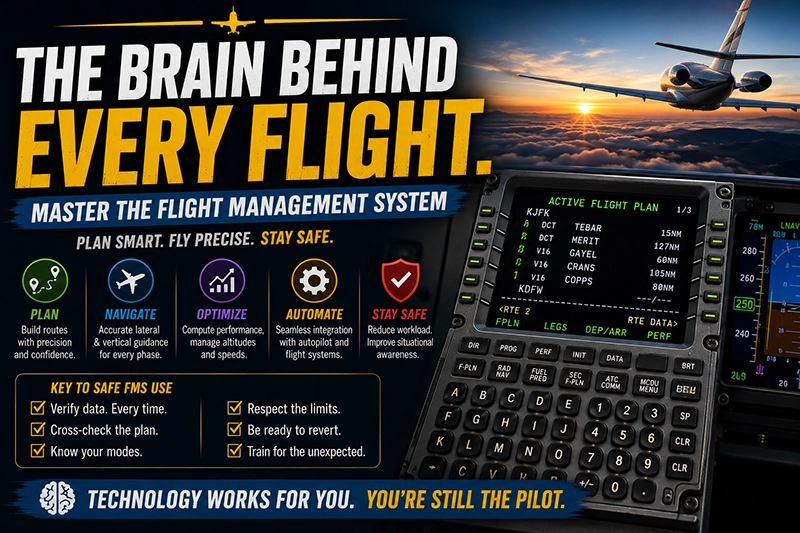
Flight management system is a phrase pilots hear from student training through airline line checks. A flight management system, or FMS, is the central avionics brain that integrates navigation, performance, and guidance information. For pilots the FMS reduces workload, improves accuracy for flight planning and navigation, and becomes the primary interface between the crew and automated flight guidance.
This article explains how pilots use an FMS in practical flight operations, what functions to understand, common pitfalls that cause incidents, and training habits that strengthen decision making. Whether you fly piston twins, turboprops, corporate jets, or airline transport category aircraft, understanding FMS concepts improves situational awareness, supports safer automation management, and helps you recover quickly when systems or data disagree.
What an FMS Is and How Pilots Interact with It
An FMS is an integrated avionics system combining navigation databases, a flight management computer, a control display unit or CDU, and interfaces to autopilot, flight director, navigation sensors, engines, and other avionics. Pilots interact with the FMS through the CDU keyboards and displays, multi-function displays, and the mode controls on the autopilot and flight director. The FMS stores routes, calculates optimum paths and performance data, and provides lateral and vertical guidance that autopilot systems can follow.
The practical pilot-side elements to recognize are: the route or flight plan in the FMS, the active and reference legs, lateral navigation modes (often called LNAV), vertical navigation modes (VNAV), the performance inputs for departure and climb, and the database that holds waypoints, procedures, and constraints. Each manufacturer implements menus and logic differently, so pilot technique focuses on core concepts, not button-by-button memorization.
Why This Matters in Real-World Aviation
FMS use directly affects safety, workload, and regulatory compliance in real operations. Properly managed, an FMS reduces pilot workload by automating routine tasks such as navigating published routes and flying optimized climb, cruise, and descent profiles. It also improves accuracy compared with manual navigation methods. Poor FMS management can introduce mode confusion, lead to navigation errors, or result in flight paths that conflict with air traffic control clearances or obstacle constraints.
In training environments the FMS is a common source of student error. In operations it is a frequent factor in incidents that trace to incorrect data entry, stale navigation databases, or misunderstandings about how vertical guidance is managed. A practical awareness of what the FMS is doing and why it is doing it is essential for safe automation use and effective pilot monitoring.
How Pilots Should Understand Key FMS Functions
Below are the primary functional areas pilots need to understand in operational terms.
Flight Planning and Route Management
Pilots use the FMS to build the flight plan, either by loading a saved route, importing a clearance, or manually entering waypoints and procedures. The flight plan has an active leg that the navigation system will follow and a reference or sequence of legs that follow. When entering route data, pilots must verify waypoints, airway transitions, and altitude constraints. Verbalizing or cross-checking entries with the other pilot reduces the chance of incorrect waypoint insertion.
Navigation Data and Databases
FMS databases contain waypoints, navaids, instrument procedures, SIDs, STARs, and runways. These databases are updated on schedules specific to the operator and aircraft. Pilots must verify database currency and be aware that changes to procedures may lag until the database update is loaded. If a procedure has been amended since the database update, pilots must cross-check charted restrictions and follow ATC or published notes, not rely blindly on the FMS database.
VNAV and LNAV Modes
LNAV provides lateral path guidance based on the flight plan. VNAV provides vertical guidance by following computed climb and descent profiles, respecting altitude constraints and speed restrictions when properly programmed. Pilots should understand how VNAV computes top-of-descent and descend profiles, and when VNAV will or will not comply with ATC altitude constraints. Sometimes VNAV will hold altitude or speed to meet constraints, and in other systems VNAV may compute a descent path that conflicts with ATC vectors. The crew must manage and, when necessary, override automated vertical guidance to remain compliant with clearances and ensure obstacle clearance.
Performance Inputs and Takeoff/Climb Profiles
Many FMS units accept performance inputs such as takeoff weight, assumed temperature, runway length, flap settings, and thrust settings. The FMS uses these to compute speeds and climb profiles. Pilots must verify that performance entries match the aircraft loading and expected configuration. Incorrect or omitted performance inputs can lead to incorrect speed guidance or unrealistic climb profiles.
Approach and Missed Approach Management
FMS systems provide lateral and optional vertical guidance for approaches when the procedure exists in the database. Pilots must select the appropriate approach, verify inbound course and altitudes, and confirm that the missed approach segment matches the published missed approach. Procedural differences between the onboard procedure and the published chart require a pilot-decision and often manual intervention to ensure the correct missed approach or holding pattern is flown if required by ATC or terrain.
Autopilot and Flight Director Interfaces
The FMS commands the autopilot and flight director by selecting modes such as LNAV, VNAV, or managed speed. Pilots must monitor the autopilot mode annunciations and crosscheck the commanded path. When the autopilot is engaged, the FMS is still a tool requiring active monitoring. If the aircraft is hand-flying, the FMS serves as a navigation reference and sometimes as a speed and vertical guidance cue that must be translated into manual control inputs by the pilot flying.
Common Mistakes and Misunderstandings
Automation significantly reduces some risks while introducing new types of errors. The following errors occur frequently in training and lower-experience operations.
Mode confusion. Pilots fail to verify the active autopilot mode, or misunderstand whether the FMS is commanding vertical or lateral guidance. This can lead to unexpected maneuvers.
Incorrect waypoint entry. Typos, misordered fixes, or loading the wrong STAR can put an aircraft off course or lead to unsafe altitudes.
Stale database assumptions. Relying entirely on an FMS procedure without confirming charted altitude or obstacle notes can produce conflicts when the database does not reflect recent changes.
Poor cross-checking. One pilot programs while the other does not verify entries; a simple cross-check would catch mismatches in runway, transition, or crossing altitudes.
Inadequate performance entry. Leaving weight or temperature fields blank, or inputting estimated values without verification, creates inaccurate speed and climb guidance.
Overreliance on VNAV for obstacle clearance. VNAV algorithms vary and do not replace pilot responsibility to ensure terrain and obstacle clearance, especially on departure or when flying non-standard procedures.
Practical Example: From Clearance to Landing
Imagine a single-leg IFR flight operated by a two-pilot crew in a turboprop or light jet. After briefing, the crew receives an ATC clearance that includes a SID and a STAR into the destination. The pilot flying enters the clearance into the FMS, starting with the departure runway, SID, en route waypoints, and the planned arrival STAR. The pilot monitoring crosschecks each entry against the ATC clearance and the flight plan page on the FMS.
Before taxi, the pilots confirm the database effective date, load performance assumptions such as takeoff weight, and enter the departure runway and expected flap and thrust settings. On departure, the FMS provides lateral guidance for the SID and computes a climb profile using the performance inputs. If ATC issues an immediate altitude constraint that differs from the SID, the crew either manually amend the altitude in the FMS or use the autopilot to capture the new altitude while maintaining situational awareness.
During cruise the FMS computes an optimized cruise speed and preferred step climbs if supported. When approaching the destination, the crew selects the planned approach in the FMS, verifies the inbound course, and confirms the missed approach procedure. If ATC vectors the aircraft for an intercept, the pilots manage the FMS accordingly by inserting a vector-to-final or by engaging the approach when stabilized on the inbound course. Before landing, the crew verifies that the FMS lateral path aligns with the published approach and that any required altitude or speed constraints are correct.
This example shows that the FMS supports the flight from preflight through landing, but its correct use depends on verification, cross-checks, and an understanding of when to override or adjust automation to meet clearances and safety constraints.
Best Practices for Pilots
Good FMS technique is part procedures and part crew discipline. The following best practices reduce error and improve safety.
Brief every procedure before programming. Verbalize runway, SID, STAR, and missed approach so both pilots share common expectations.
Cross-check entries. One pilot programs while the other verifies the flight plan entries, performance data, and approach selection.
Monitor mode awareness. Announce and monitor autopilot and flight director modes when engaging or when significant mode changes occur.
Confirm database currency. Know the effective date and update schedule for navigation databases and question discrepancies between charts and onboard procedures.
Understand limitations. Recognize that FMS logic varies; don't assume identical behavior across different aircraft types or manufacturers.
Practice manual reversion. Train hand-flying with navigation references, and practice reversionary procedures for degraded navigation or autopilot failures.
Enter performance data accurately. Weight, flap, temperature, and thrust settings matter for VNAV guidance; verify before reliance on automated speeds.
Training Focus: Teaching FMS Skills
Flight instructors should incorporate FMS training early and often. Initial sessions should cover route entry, basic CDU operation, and how VNAV and LNAV interact with autopilot modes. Scenario-based training that includes ATC amendments, missed approaches, and degraded navigation will improve student decision making. Emphasize cognitive skills such as anticipating the system's behavior and confirming the FMS will comply with ATC clearances and terrain constraints.
For advanced training, include mode awareness drills, failure injection scenarios, and manual navigation cross-checks using raw data and independent instruments. Encourage students to fly approach intercepts manually while using the FMS for navigation reference so they learn to translate automation guidance into stick and thrust inputs.
Common Operational and Safety Risks
FMS misuse can contribute to operational errors. Mode confusion remains a leading causal factor when crews become task-saturated or tacitly assume the system will handle a clearance automatically. Waypoint insertion mistakes and misinterpretation of constraint compliance can create deviations from protected airspace or published altitude constraints.
Another area of risk is degraded-sensor navigation. If GPS or other navigation sources fail or become unreliable, the FMS may revert to alternate sensors or lose certain guidance modes. Pilots must recognize degraded navigation flags, revert to approved procedures, and ensure ATC is informed when navigation capability changes. Regular training in reversion and redundancy procedures mitigates this risk.
How to Recover When Things Go Wrong
If the FMS provides unexpected guidance or displays a disagreement with raw instruments, follow these steps: first, immediately establish safe flight by flying the aircraft using reliable raw instruments or autopilot mode appropriate to the situation. Second, confirm navigation sensors and crosscheck position with independent sources. Third, if necessary, revert to conventional navigation and inform ATC if you cannot comply with the cleared route. Finally, complete a thorough review after the flight to capture lessons learned and correct any procedural deficiencies.
Frequently Asked Questions
What is the difference between LNAV and VNAV?
LNAV provides lateral guidance along the programmed flight plan. VNAV provides vertical guidance by calculating climb and descent profiles based on performance inputs and altitude constraints. Pilots should verify both modes before relying on autopilot guidance.
How often should FMS databases be updated?
Database update schedules vary by operator and equipment. Pilots should verify the effective date before flight and follow company or operator guidance for update cycles. If procedure changes are suspected, cross-check charted procedures directly.
Can I use FMS VNAV to guarantee obstacle clearance?
No. VNAV provides computed profiles based on inputs and database constraints, but it does not replace the pilot's responsibility for terrain and obstacle clearance. Always verify departure and arrival procedures against charts and apply conservative logic when operating near terrain.
What should I do if I suspect a waypoint is entered incorrectly?
Immediately compare the flight plan page against the clearance and charts. Use the map or LIST display to visually confirm the route. If the error could affect lateral or vertical guidance, correct it promptly and re-verify the active leg before continuing under automation.
How do I avoid mode confusion when engaging automation?
Announce mode changes, use a two-person verification routine, and scan the autopilot and flight director mode annunciations. Practice predictable inputs and avoid last-minute mode changes when task loading is high.
Key Takeaways
- Practical takeaway: Use the FMS to reduce workload but verify every flight plan entry and performance input before relying on automation.
- Safety takeaway: Maintain mode awareness and cross-check automated guidance against raw instruments and charts to prevent unintended deviations.
- Training takeaway: Integrate scenario-based FMS drills into regular training to practice reversion, database checks, and approach management.
Understanding an FMS is less about memorizing buttons and more about mastering the system's logic, limits, and role in crew resource management. With disciplined programming, regular cross-checks, and scenario-based practice, pilots can use FMS technology to enhance safety and efficiency while avoiding common pitfalls.