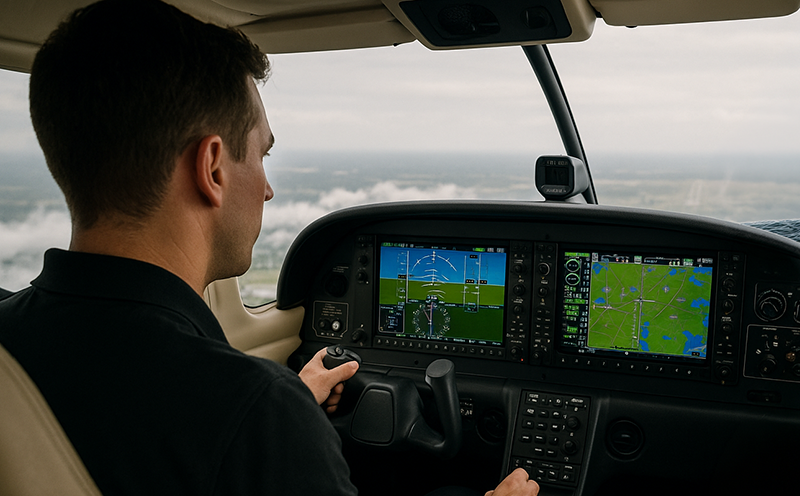
Using automation without losing manual flying skills is one of the most important training habits in modern aviation. Autopilots, flight directors, GPS navigators, flight management systems, electronic flight displays, and envelope awareness tools can reduce workload and improve precision when they are understood and managed correctly. They can also quietly weaken the pilot’s basic scan, pitch and power control, trim technique, and aircraft feel if every flight becomes a systems-monitoring exercise.
The goal is not to distrust automation. The goal is to use it deliberately. A well-trained pilot knows when automation helps, when it distracts, when it should be disconnected, and how to continue safely if it fails or produces an unexpected result. This article explains how pilots, student pilots, instructors, and aviation professionals can build a practical balance: use cockpit technology for better situational awareness and workload management while preserving the manual skills that remain essential to safe aircraft control.
Automation Is a Tool, Not a Pilot Replacement
Aircraft automation ranges from a simple wing-leveler autopilot to sophisticated integrated systems that can manage lateral navigation, vertical navigation, approach coupling, altitude capture, and speed targets. Even in a technically advanced aircraft, automation does not remove the pilot’s responsibility to understand the flight path, monitor aircraft performance, and intervene when needed.
Good automation management begins with a simple question: what do I want the aircraft to do, and what system mode will make that happen? If the pilot cannot answer that question, engaging automation may add confusion rather than reduce workload. A pilot who selects a mode without understanding the expected behavior can be surprised by an altitude capture, a turn toward the wrong fix, a missed vertical path, or a speed trend that was not anticipated.
Manual flying skills are the foundation beneath that decision-making. Hand flying teaches the pilot how the aircraft responds to pitch, power, trim, configuration changes, wind, turbulence, and weight changes. It reinforces the relationship between attitude and performance. It also keeps the pilot connected to the airplane’s energy state, which is the combination of altitude, airspeed, power, drag, and flight path.
Automation works best when it is layered on top of strong stick-and-rudder competence. A pilot with solid manual skills is better prepared to monitor automation because the aircraft’s behavior makes sense. If the flight director commands an unusual pitch attitude, if the autopilot begins an unexpected turn, or if the airplane is not tracking the expected path, the proficient pilot detects the problem quickly because the picture does not match the plan.
Why This Matters in Real-World Aviation
In real-world flying, automation often earns its place. It can reduce fatigue on long cross-country legs, help maintain altitude and heading precisely, improve cockpit organization during instrument operations, and provide more time for weather evaluation, fuel monitoring, traffic awareness, and communications. In single-pilot operations, especially in instrument meteorological conditions, a properly used autopilot can be a major workload management tool.
However, the same convenience can create dependency. If a pilot rarely flies by hand except during takeoff and landing, the fine motor habits and mental models required for precise aircraft control can fade. The first sign may not appear on a calm local flight. It may appear during a busy arrival, a gusty approach, an unexpected automation disconnect, a reversionary display mode, a missed approach, or an abnormal situation that demands immediate aircraft control.
Manual skill erosion is not simply about being able to keep the wings level. It involves maintaining a disciplined instrument scan, controlling pitch and power without chasing indications, trimming accurately, anticipating configuration changes, and recognizing trends early. These are perishable skills. They improve with intentional practice and weaken when neglected.
Flight instructors see this pattern often in technically advanced aircraft. A student may know how to load a procedure, activate a leg, and arm an approach mode, yet struggle to hold altitude by hand while copying a clearance. Another pilot may be comfortable with coupled approaches but less comfortable flying a raw-data localizer or maintaining a constant descent profile without vertical guidance. The issue is not lack of intelligence or motivation. It is a training balance problem.
How Pilots Should Understand Automation
Automation should be understood in layers. The first layer is aircraft control: pitch, bank, power, trim, and configuration. The second layer is guidance: flight director commands, navigation sources, altitude targets, and vertical path information. The third layer is management: programming routes, selecting modes, verifying databases, sequencing procedures, and monitoring system status.
When those layers are kept in the right order, the pilot remains in control. If aircraft control becomes secondary to button pushing, priorities have become inverted. The airplane must always be flown first, whether by hand or through automation that is actively monitored. Automation can control the aircraft, but the pilot controls the automation.
Mode awareness is central to this concept. Mode awareness means knowing what the automation is doing now, what it is armed to do next, and what condition will trigger the next change. For example, an autopilot might be holding a heading now, armed to capture a navigation course, and set to level at a selected altitude. If the pilot does not understand these current and future states, the system may appear to act on its own.
Another useful concept is automation level selection. On one flight segment, the best level may be hand flying with no flight director. On another, it may be hand flying with the flight director displayed. During a busy cruise segment in instrument conditions, a coupled autopilot may be appropriate. During training, a deliberate reduction in automation may be more valuable than perfect track-keeping. The skilled pilot chooses the level that fits workload, proficiency, weather, airspace, and training objectives.
There is also a difference between using automation and hiding behind it. Using automation means setting it up correctly, briefing what it should do, monitoring the result, and staying ready to intervene. Hiding behind automation means allowing the system to mask weak scan habits, poor trim technique, incomplete understanding of aircraft performance, or uncertainty about the route and procedure.
The Manual Skills Pilots Need to Protect
Manual flying is more than moving the controls. It is an integrated set of physical and cognitive skills that allows a pilot to control the aircraft accurately while maintaining awareness and making decisions. The most important skills to protect include attitude control, trim discipline, energy management, visual and instrument scan, crosswind correction, and the ability to fly predictable profiles.
Attitude control is the starting point. In visual conditions, that means using outside references and confirming performance with the instruments. In instrument conditions, it means using the attitude indicator, performance instruments, and navigation information without fixating on one display. Automation can fly a very stable attitude, but it cannot teach the pilot what stable aircraft control feels like unless the pilot practices by hand.
Trim discipline is another perishable skill. A pilot who routinely allows the autopilot to manage control pressures may become less sensitive to out-of-trim conditions. Hand flying reinforces the habit of trimming after every pitch, power, configuration, or speed change. Proper trim reduces workload and improves precision. Poor trim increases workload, encourages overcontrol, and can make an automation disconnect more demanding.
Energy management connects power, pitch, airspeed, altitude, and drag. It matters in every phase of flight, but especially in climbs, descents, approaches, and go-arounds. Automation can maintain a selected path, but the pilot must still understand whether the aircraft has enough energy, too much energy, or the wrong configuration for the desired outcome. A pilot who notices energy trends early has more options and fewer surprises.
Scan is equally important. In a glass cockpit, the amount of available information can be impressive, but more information does not automatically produce better awareness. Pilots still need a disciplined scan that separates control, performance, navigation, engine indications, traffic, terrain, weather, and communication tasks. Manual flying forces that scan to remain active. Automation monitoring requires the same discipline, but it can become passive if the pilot is not intentional.
Common Mistakes or Misunderstandings
One common misunderstanding is that automation proficiency and manual proficiency are competing goals. They are not. Modern pilots need both. A pilot who avoids automation may become overloaded in situations where automation would provide useful support. A pilot who overuses automation may become uncomfortable when required to fly manually. The professional standard is balanced competence.
Another mistake is waiting too long to disconnect automation when it is not doing what the pilot expects. If the aircraft’s path, pitch, bank, speed, or mode does not match the pilot’s intention, the safest first step may be to reduce the automation level. That may mean changing a mode, using basic pitch and roll modes, or disconnecting the autopilot and flying by hand. The exact action depends on the aircraft and situation, but the principle is universal: do not spend valuable time negotiating with confusing automation while the aircraft diverges from the desired flight path.
A related error is programming during high workload. Loading, modifying, or troubleshooting automation near the final approach course, close to level-off, in turbulence, or during a complex clearance can consume attention quickly. If the aircraft is being hand flown, this can lead to altitude, heading, or airspeed deviations. If the autopilot is engaged, it can still lead to mode confusion or navigation errors. Pilots should manage automation early when possible and use simple, reliable modes when workload rises.
Some pilots also assume the autopilot will compensate for an unstable plan. It will not solve poor energy management, late descents, confusing clearances, weak briefings, or incorrect configuration choices. Automation may make an unstable situation look orderly for a short time, but the pilot still needs to evaluate whether the aircraft is in the right place, at the right speed, in the right configuration, and on the right path.
Another subtle mistake is letting the flight director become a command to follow without judgment. The flight director is guidance, not authority. If it commands something unexpected, the pilot should verify mode selection, navigation source, selected altitude, aircraft configuration, and the intended flight path. Following incorrect or misunderstood guidance can be just as hazardous as hand flying poorly.
Finally, some pilots treat manual flying practice as something to do only in perfect conditions. Smooth-air practice is valuable, especially for precision, but pilots also need instructor-guided exposure to realistic workload, wind correction, instrument scan, and abnormal automation scenarios. The practice should be structured, safe, and appropriate to the pilot’s certificate, experience, aircraft, and operating environment.
Practical Example: A Busy IFR Arrival
Consider a proficient instrument pilot flying a technically advanced single-engine airplane on an IFR cross-country. The aircraft is in cruise with the autopilot coupled to GPS navigation. Weather at the destination is above minimums but includes a low ceiling, light rain, and gusty surface winds. Air traffic control issues a descent and later vectors the aircraft toward an instrument approach.
Early in the arrival, the autopilot is helpful. It maintains heading and altitude while the pilot reviews the approach, checks weather, briefs minimums and missed approach instructions, verifies frequencies, and plans the descent. The pilot remains engaged by checking the flight mode annunciations, confirming the selected altitude, monitoring power changes, and comparing the aircraft’s path to the clearance.
Closer to the approach, workload increases. ATC assigns a heading and intercept angle. The pilot selects the appropriate navigation source, confirms the approach is loaded correctly, and verifies the expected mode changes before intercept. The aircraft begins to capture the final approach course. The pilot notices the vertical path is not behaving as expected. Rather than continuing to troubleshoot in a high-workload moment, the pilot levels the automation strategy: maintain aircraft control first, use a simple lateral mode or hand fly as needed, and request clarification or delay if necessary.
Now imagine the autopilot disconnects unexpectedly inside the final approach fix. A pilot who has practiced manual instrument flying recognizes the first priority immediately: pitch, power, trim, and scan. The pilot maintains the approach attitude, cross-checks altitude and descent rate, corrects for wind, and continues only if the approach remains stable and within personal and operational limits. If not, the pilot executes the missed approach using the appropriate published or assigned procedure.
The lesson is not that automation failed. The lesson is that the pilot had a plan for both automation use and manual control. The autopilot was a workload tool, not a single point of confidence. Because manual skills were current, the pilot did not have to relearn basic aircraft control during the busiest part of the flight.
Best Practices for Preserving Manual Flying Skills
The best way to preserve manual flying skills is to make hand flying a normal part of training and operations, not an occasional emergency backup. That does not mean hand flying every segment or refusing useful technology. It means choosing specific times to practice manual control when conditions, airspace, workload, and safety margins allow it.
In visual conditions, pilots can practice smooth pitch and power changes, coordinated turns, altitude and heading control, climbs, descents, slow flight awareness, and pattern work. In instrument training or recurrent proficiency flying, pilots can practice basic attitude instrument flying, partial panel procedures appropriate to the aircraft, raw-data tracking, holds, intercepts, and approaches with appropriate instructor or safety pilot support when required.
One effective habit is to brief the planned automation level before each phase of flight. For example, a pilot might decide to hand fly the departure to a safe altitude, engage the autopilot during cruise to manage workload, hand fly a portion of the descent in visual conditions, and use or disconnect the autopilot on approach depending on weather, workload, and proficiency goals. The point is to decide intentionally rather than defaulting to maximum automation at every opportunity.
Another best practice is to verbalize mode changes. In crew operations this is standard cockpit discipline, but it is also valuable for single-pilot flying. Saying “heading mode, altitude capture armed” or “navigation mode active, approach armed” reinforces awareness. The words should reflect the aircraft’s actual annunciations and behavior, not assumptions.
Pilots should also practice automation surprises in a controlled training environment. Examples include an unexpected autopilot disconnect, a wrong navigation source, failure to capture an altitude because of incorrect setup, or a need to revert from a complex mode to basic pitch and roll control. These scenarios should be tailored to the aircraft and conducted with an instructor when appropriate.
Training should include the uncomfortable middle ground between full automation and no automation. Many pilots can fly manually, and many can operate a coupled autopilot, but fewer are equally fluent at intermediate levels such as hand flying with a flight director, using heading mode while managing vertical speed manually, or reverting from navigation mode to heading mode during a clearance change. That middle ground is where real operations often happen.
Useful habits include:
- Hand fly regularly when conditions are suitable and workload is manageable.
- Know the autopilot and flight director modes before relying on them in busy airspace.
- Monitor flight mode annunciations after every selection, clearance, and procedure change.
- Practice trim, scan, and energy management without depending on the autopilot.
- Disconnect or simplify automation promptly when it creates confusion.
- Use recurrent training to practice both automation management and manual proficiency.
Instructor Strategies for Teaching the Balance
Flight instructors play a major role in preventing automation dependency. The challenge is to teach technology without allowing it to replace fundamental airmanship. Students should learn early that automation is part of aircraft management, while manual control remains the foundation.
A useful instructional approach is progressive layering. First, the student learns to fly the aircraft accurately by outside references and basic instruments. Next, the instructor introduces navigation equipment and flight director concepts. Then the student learns autopilot modes, limitations, and monitoring. Finally, scenarios combine hand flying, automation management, abnormal events, and decision-making.
Instructors should avoid letting avionics programming consume entire lessons. If a student is heads-down for too long, the instructor can pause the avionics task and return attention to aircraft control. This teaches an important operational truth: if programming is taking too much attention, simplify, ask for help, use vectors if available, hold if appropriate, or fly the airplane first.
Scenario-based training is particularly effective. Rather than simply saying “turn off the autopilot,” an instructor can create a reason: ATC issues a late runway change, the flight director shows unexpected guidance, turbulence increases, or the pilot must fly a visual approach after a long automated cruise. The objective is to develop judgment, not just hand-eye coordination.
Instructors should also encourage honest self-assessment. A pilot who feels rusty hand flying should not be embarrassed. That recognition is useful. The solution is not to avoid challenging conditions forever, but to rebuild skill deliberately through dual instruction, simulator practice when appropriate, and structured proficiency flights.
Automation Management in Different Flight Phases
During departure, automation can reduce workload after the aircraft is configured, climbing, and stable. However, early engagement should not replace the pilot’s ability to maintain pitch, airspeed, heading, and obstacle clearance manually. Pilots should understand any aircraft-specific guidance regarding autopilot use, including approved engagement conditions and limitations from the aircraft flight manual or pilot’s operating handbook.
In cruise, automation is often at its best. It can maintain altitude and course accurately while the pilot manages fuel, weather, traffic, systems, and planning. Cruise is also a good time to review the next automation sequence before workload increases. A pilot should know the next clearance expectation, the descent strategy, the active navigation source, and the modes likely to be used.
During descent and arrival, automation can become more complex. The aircraft is changing altitude, speed, configuration, and routing while the pilot receives clearances and prepares for an approach or landing. This is where mode awareness matters most. If vertical guidance, altitude constraints, or speed control are misunderstood, the aircraft may remain high, descend unexpectedly, or fail to meet the pilot’s plan. The pilot must remain ahead of the airplane.
On approach, automation strategy should be briefed. Some pilots may use a coupled approach when appropriate and approved for the aircraft and procedure. Others may hand fly to maintain proficiency or because conditions favor a simpler setup. Either choice can be reasonable if it is made deliberately, monitored carefully, and consistent with aircraft limitations, pilot proficiency, and operating rules.
During landing and go-around, pilots must be prepared for rapid transitions. A go-around after an automated approach requires immediate attention to power, pitch, configuration, navigation, and communication. If automation remains engaged, the pilot must understand exactly what it will do. If it is disconnected, the pilot must be ready to fly the aircraft precisely. This is not the time to discover uncertainty about modes or manual control.
Building a Personal Automation Policy
A personal automation policy is a practical set of habits that helps a pilot decide when to use automation and when to hand fly. It does not replace regulations, aircraft limitations, company procedures, or instructor guidance. It simply gives the pilot a consistent framework for good judgment.
A strong personal policy might include several principles. First, use automation to reduce workload, not to compensate for lack of preparation. Second, hand fly enough to remain comfortable in normal and abnormal situations. Third, always verify mode annunciations after making a selection. Fourth, simplify automation when confused. Fifth, seek recurrent training before flying demanding conditions after a period of low activity.
The policy should also account for personal minimums. A newly certificated instrument pilot may choose more conservative weather and workload limits while building experience. A pilot transitioning into a glass-cockpit aircraft may need dedicated training on avionics before using advanced functions in instrument conditions. A high-time pilot returning after time away may need to rebuild both manual and automation skills. Proficiency is not permanent, and automation proficiency is aircraft-specific.
Frequently Asked Questions
Should pilots hand fly every flight to maintain proficiency?
Not necessarily. The better goal is intentional practice. Pilots should hand fly regularly when conditions are appropriate, but automation is valuable when it reduces workload and supports safer decision-making. The balance depends on weather, airspace, aircraft, workload, and pilot proficiency.
Can too much autopilot use weaken instrument flying skills?
Yes, it can if the pilot rarely practices manual instrument control. Instrument scan, pitch and power control, trim, and raw-data navigation are perishable skills. Regular practice with an instructor or qualified safety pilot when needed helps preserve those skills.
When should a pilot disconnect the autopilot?
A pilot should consider disconnecting or simplifying automation whenever the aircraft is not doing what the pilot expects, when mode confusion develops, or when hand flying is the safer and simpler way to maintain control. The exact action should follow aircraft procedures and the situation.
Is it better to fly an approach coupled or by hand?
Neither choice is automatically better. A coupled approach may reduce workload in some conditions, while a hand-flown approach may support proficiency and situational awareness when workload is manageable. The pilot must consider aircraft approval, procedure requirements, weather, proficiency, and operational policy.
How can instructors prevent automation dependency?
Instructors can teach fundamentals first, introduce automation in layers, require students to explain mode selections, and create scenarios where students must simplify automation or fly manually. The objective is confident aircraft control combined with thoughtful automation management.
What is the most important automation habit for single-pilot IFR?
Mode awareness is one of the most important habits. The pilot should know what the automation is doing now, what it is armed to do next, and whether the aircraft’s actual performance matches the clearance and flight plan.
Key Takeaways
- Automation is most effective when it supports a pilot who already has strong manual flying skills, disciplined scan habits, and sound energy management.
- If automation creates confusion or the aircraft does not follow the expected path, pilots should simplify the system, fly the airplane, and restore situational awareness.
- Manual flying proficiency should be practiced intentionally through normal flying, recurrent training, instructor-led scenarios, and thoughtful automation level selection.