Airline simulators are the primary training environment where professional pilots practice emergency procedures, decision making, and crew coordination without endangering people or equipment. For pilots, student pilots, instructors, and safety professionals, understanding how airline simulators replicate real emergencies clarifies what training can reliably teach and where real-world judgment must still bridge gaps.
This article explains the hardware, software, and instructional techniques used to create realistic emergency scenarios in airline simulators. It also examines practical training benefits, known limitations, common misunderstandings, and specific ways pilots should interpret simulator experience when they transition back to the airplane. Throughout, the goal is operational clarity: what pilots can learn in the sim, how to extract lasting proficiency, and how to design or evaluate simulator sessions for real safety value.
How Simulators Recreate Emergencies: The Core Systems
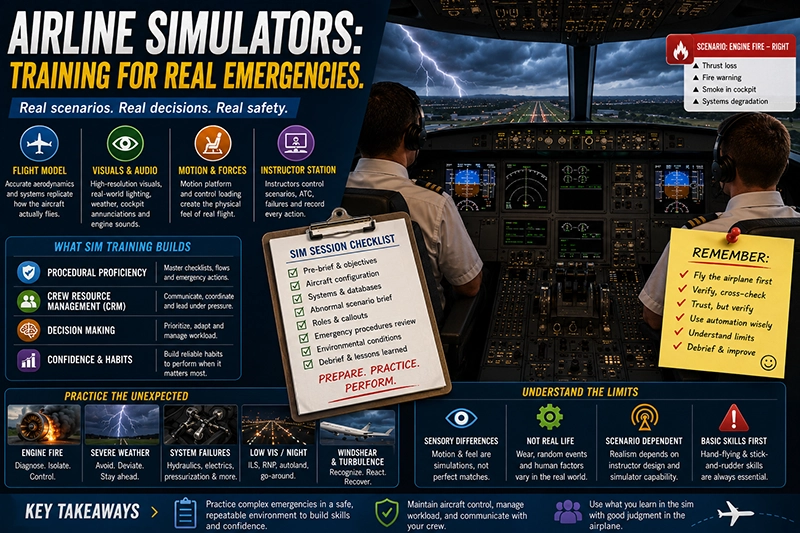
Reproducing a credible emergency in a simulator is a systems engineering exercise. Most modern airline simulators combine four core technical subsystems with an instructor-led scenario design to produce a convincing event.
First, the flight dynamics and aerodynamic model replicate how the aircraft responds to control inputs, configuration changes, and damage conditions. The flight model must simulate altered aerodynamics after system failures, asymmetric thrust after engine loss, control-surface anomalies, and degraded performance when flight controls are restricted.
Second, the visual and sensory systems provide cues that inform pilot perception. High-resolution external visuals, accurate runway and terrain databases, day/night lighting, weather effects, and instrument panel lighting help recreate the visual environment. Audio systems reproduce engine noise, annunciators, cockpit warnings, and crew communication. Some sims add vibration and tactile cues through cockpit shaking or yoke forces.
Third, motion and force feedback systems translate aircraft accelerations and control forces into pilot sensations. Motion platforms simulate acceleration, tilt, and vibration to give vestibular and proprioceptive information. Force feedback on controls and rudder pedals conveys aerodynamic loads and asymmetric control forces. Motion systems are designed to present cues that align with visual and flight-model information so the brain can fuse multisensory data into a coherent experience.
Fourth, the instructor operating station and scenario logic orchestrate failures, manage air traffic control interactions, trigger system warnings, and record pilot actions. The instructor can introduce step failures, progressive degradation, or sudden catastrophic events, and control environmental variables such as visibility and wind. Scenario scripting and real-time control let instructors tailor difficulty and learning objectives.
When these subsystems are tuned and coordinated, the simulator can evoke the perceptual and cognitive demands of real emergencies: diagnosis, prioritization, crew communication, and procedural execution.
Why This Matters in Real-World Aviation
Training in airline simulators reduces risk by letting crews practice high-consequence failures without physical danger. Sim sessions sharpen procedural memory, reinforce crew resource management, and expose latent human factors issues that rarely emerge in line operations. For airlines and training departments, the ability to validate emergency checklists, rehearse rare events, and test cross-crew communication provides measurable safety value.
Beyond procedural rehearsal, simulators are invaluable for building nontechnical skills. Under stress, pilots must maintain situational awareness, manage workload, and communicate clearly with crew and ATC. Realistic simulator emergencies create time pressure, competing priorities, and ambiguous information—conditions where human error is likely in flight. Repeated exposure under guided instruction helps pilots develop habits that reduce error probability in the airplane.
Simulated emergencies also support operational testing. Airlines use simulators to introduce procedural changes, evaluate the implications of maintenance-induced limitations, and validate abnormal checklists before issuing them to line crews. In these roles, simulators serve as a low-risk testbed that can uncover unforeseen interactions between systems or procedures.
How Pilots Should Understand Simulator Fidelity
Fidelity is the degree to which a simulator reproduces real-world aircraft behavior and cues. It is multi-dimensional: aerodynamic fidelity, systems fidelity, visual fidelity, motion fidelity, and procedural fidelity. Pilots should evaluate simulator experience across these dimensions rather than treating “the sim” as a single, absolute indicator of real-world performance.
A high-fidelity simulator excels at reproducing control responses, automation behavior, and system logic. That makes it very effective for practicing abnormal checklists, cross-check discipline, and crew coordination. However, certain sensory cues remain approximate. For example, vestibular sensations of prolonged acceleration, subtle engine surges, or tactile feedback from ailing components can be difficult to model exactly. Weather cues like turbulence pockets or rapid microbursts are represented through visual, motion, and noise cues, but the exact feel often differs from flying the same conditions in the aircraft.
Pilots should therefore treat simulator experience as conditional training. What transfers reliably are cognitive processes, procedural proficiency, and CRM behaviors. Sensory perception of some failures may not transfer perfectly, so pilots should combine simulator learning with sound airmanship and conservative decision making in the airplane.
How Instructors Design Realistic Emergency Scenarios
Designing an effective emergency scenario requires deliberate pedagogical choices. The instructor begins with learning objectives: whether the session targets technical skills, memory recall of checklists, or nontechnical skills like communication and workload management. The scenario design follows these objectives and chooses how, when, and which failures to introduce.
Good scenario design balances surprise with safety and learning. A sudden catastrophic failure can produce valuable startle-management lessons, but if introduced without scaffolding it may overwhelm trainees and degrade learning. Many instructors prefer progressive failures: introduce a small anomaly, allow the crew to recognize and respond, then introduce compounding elements—automation disconnect, weather deterioration, or additional system warnings. This approach forces crews to prioritize tasks and manage workload while maintaining control of the aircraft.
Instructor interaction matters. Real emergencies involve ambiguity and coordination with external stakeholders such as ATC. Providing realistic radio traffic, plausible dispatch and maintenance documentation, and simulated cabin communication improves contextual realism. Recording and debriefing are essential. High-quality debriefs replay system states, timelines, and CVR-like audio so pilots can dissect decisions and recognize performance gaps.
Technical Elements That Improve Realism
Several technical elements materially increase perceived realism and the training value of a scenario.
Accurate systems logic. The simulator must model annunciators, failures, and abnormal system interactions exactly or very closely to the aircraft. If the automation does not present the same failure behaviour, crews can learn incorrect diagnosis patterns.
Timely and consistent cueing. Visual, audio, and motion cues must align. When cues conflict, pilot suspicion about the scenario grows and learning suffers.
Environmental integration. Accurate weather, lighting, and airport databases create context for decision making. Poorly modeled environments can mislead pilots about approach minima, visual cues, or runway performance implications.
Human factors realism. Authentic ATC phraseology, cabin crew interaction, and passenger-related cues force crews to practice real communication decisions and prioritize actions under stress.
Limitations and Where Simulator Training Diverges from Reality
Recognizing simulator limitations is essential for safe transfer of training. Some important divergences include:
Sensory mismatch. Motion platforms approximate acceleration with limited ranges and cueing algorithms. Vestibular sensations and subtle tactile feedback from actual airframe damage can be absent or artificially simulated.
Irreversible consequences. In the airplane, system failures can cascade differently because aircraft components age and maintenance states vary. Simulators cannot perfectly reproduce every degraded component or unexpected maintenance-induced failure mode.
Startle realism. The emotional and physiological response to a real in-flight emergency with actual risk can exceed that elicited by a simulator, which can affect decision making under true threat.
Automation variances. Differences between simulator software versions and an airline's operational fleet can produce inconsistent automation behaviors. Pilots must be aware of the variant and software level they are training on.
Because of these limitations, instructors and check airmen should emphasize how simulated lessons should be applied in flight. Simulator outcomes should be combined with conservative margins, sound judgment, and recognition of uncertain cues when operating the actual aircraft.
Human Factors: Startle, Stress, and Teamwork
A large part of emergency performance is human factors. Simulators provide the only practical way to expose crews to the cognitive and emotional load of emergencies. Startle response, tunnel vision, fixation on instruments or a single task, loss of situational awareness, and breakdowns in communication are all factors that lead to poor outcomes in real emergencies.
Training that deliberately integrates human factors—controlled surprise, workload management drills, and realistic communication tasks—helps crews learn how to resist fixation, delegate tasks, and maintain a shared mental model of the aircraft's status. Repeated exposure to stress in a safe environment builds coping strategies. Debriefing that focuses on decision points and cognitive cues helps pilots identify where their attention narrowed or assumptions were incorrect.
Common Mistakes or Misunderstandings
Pilots and training organizations sometimes misinterpret the role of simulator training. Common mistakes include:
Assuming sensory perfect transfer. Believing that a simulator will reproduce the exact feel of every failure leads to overconfidence. Some tactile and vestibular cues cannot be reproduced precisely.
Treating sim success as proof of real-world immunity. Passing a sim session does not guarantee flawless performance in a real emergency because real conditions introduce additional variability and emotional load.
Neglecting nontechnical skills. Over-focusing on checklists and system memory can ignore communication, leadership, and workload management—skills that often determine outcomes in complex emergencies.
Using unrealistic scenario pacing. Scenarios that either spoon-feed the crew or overwhelm them without intermediate steps limit learning. Effective training finds the right challenge point.
Assuming uniform simulator fidelity. Not all simulator suites provide equivalent fidelity across models or operators. Simulators vary by software version, motion system capability, and instructor experience.
Practical Example: Handling an Engine Fire in Cruise
Consider a realistic training scenario for an engine fire in cruise. The objective is to practice diagnosis, engine shutdown, diversion planning, and crew communication under time pressure.
The instructor initiates the scenario by triggering an engine fire warning on one engine, followed by escalating smoke indications and degraded thrust. The flight model simulates asymmetric thrust and degraded climb capability. The visual system and audio reproduce a slight yaw tendency and engine noise changes. The instructor introduces simulated fuel imbalance and a possible hydraulic pressure change to increase complexity.
The crew must first fly the aircraft, establish control, and assess the situation. One pilot calls for the fire checklist, the other stabilizes the aircraft and identifies the affected engine. The instructor models a delayed fire extinguishment after the crew isolates the engine, forcing the crew to make a diversion decision and coordinate with ATC. The scenario includes realistic ATC interactions, a simulated cabin announcement, and the need to select a suitable diversion airport with runway length and weather considerations.
Debriefing uses recorded flight data and cockpit voice playback to analyze timeline, callouts, and task sharing. Instructors focus on decision making: was the engine properly isolated, did the crew maintain safe airspeed, how effectively did they manage checklist interruptions, and did they consider the nearest suitable airport reasonably?
This exercise illustrates how an integrated sim scenario reinforces procedural memory, prioritization, and CRM while exposing crew-level weaknesses that are hard to recreate in routine line operations.
Best Practices for Pilots Using Simulators
Use simulator training intentionally to maximize transfer to flight operations:
Set clear learning objectives before the session. Know whether you are practicing memory recall, automation management, or CRM under surprise.
Treat the simulator as a realistic, but not perfect, stand-in for the airplane. Be skeptical of cues that feel inconsistent and question whether a perceived behavior is model artifact or genuine aircraft characteristic.
Prioritize flying first. Instructors should expect the crew to maintain aircraft control before engaging checklists or discussions.
Practice decision making under different assumptions. Run variants where automation behaves differently, or where weather and airport options differ, to prevent rigid, checklist-only thinking.
Use thorough debriefs. Analyze decision points, workload allocation, and communication. Replay data and audio to find latent performance issues.
Cross-check simulator configuration. Verify that the simulator software and model version match the airline fleet standard before training begins.
Evaluating Simulator Quality and Training Value
Training departments and instructors should evaluate simulator quality based on alignment to training objectives rather than solely on marketing claims of fidelity. Useful evaluation criteria include:
Systems fidelity for targeted failures. If the aim is to practice electrical failures, confirm the simulator models the aircraft's electrical architecture and annunciation logic accurately.
Motion and visual integrity. Check that visual cues, runway depiction, and motion cues are consistent and synchronized for the scenarios you intend to fly.
Instructor tools and recording capabilities. Effective debriefs depend on robust recording, timeline control, and the ability to inject or modify failures during playback.
Scenario realism. Verify that ATC simulation, cabin interactions, and environmental variables are sufficiently realistic for your CRM objectives.
Frequently Asked Questions
How realistic are airline simulators for emergency training?
Airline simulators are highly realistic for system logic, procedural practice, and decision-making training. They reproduce avionics, engine and system behaviors, and provide realistic visual and audio cues. Motion and tactile cues are approximations. Pilots learn cognitive and procedural skills extremely well, while some sensory differences mean pilots should combine sim experience with conservative judgment in real flight.
Can simulator training prepare pilots for the stress of a real emergency?
Simulators can recreate many stressors such as surprise, time pressure, and high workload, which helps pilots build coping strategies. However, the emotional intensity of a real life-threatening event can exceed simulator-induced stress. Repeated, well-designed sim exposure improves resilience but does not fully replicate the visceral risk of an actual emergency.
Are all simulators the same quality?
No. Simulator quality varies by model, software version, motion system, visual system, and the operator's scenario design expertise. Training value depends on alignment between simulator capability and training objectives rather than a universal fidelity label.
How should pilots apply lessons learned in the sim to line operations?
Apply procedural discipline, communication routines, and prioritization strategies learned in the sim. Recognize the limits of sensory transfer and maintain conservative margins in real flight. Use sim debriefs to adjust individual and crew standard operating procedures where appropriate.
What should instructors avoid when designing emergency scenarios?
Instructors should avoid scenarios that either hand-hold the crew or overwhelm them without intermediate challenge. Avoid unrealistic cueing or contradictory system behavior that confuses diagnosis. Scenarios should be tailored to learning goals and incorporate debriefs that focus on cognitive and CRM lessons as much as procedural execution.
Key Takeaways
- Practical takeaway: Use the simulator to rehearse diagnosis, procedural flow, and crew coordination under stress to build durable skills.
- Safety takeaway: Simulator success does not guarantee immunity to all real-world surprises; pilots must combine sim-honed procedures with conservative judgment in flight.
- Training takeaway: Design scenarios with clear learning objectives, progressive challenge, realistic cues, and thorough debriefing to maximize transfer of training.
Simulator training is a cornerstone of modern airline safety. When technical fidelity and instructional design align, sims are powerful tools for reducing risk, improving decision making, and strengthening crew performance in emergencies. Understanding both the strengths and limits of simulators helps pilots, instructors, and operators get the most safety benefit from each session while maintaining realistic expectations for performance in the real aircraft.